 Clean House
DaisyDisk is an excellent disk visualizer at $9.99 once. Free alternatives are GrandPerspective, OmniDiskSweeper and Disk Inventory X. Clean House shows space too, and adds a plain reason and a Safe, Look first or Keep call for each item. Finder's Get Info and Apple's Storage settings help for quick checks.
Disclosure. We make Clean House. The screenshot and Gradle example below come from our own Mac. We used official documentation for the other tools’ workflows. This guide has no side-by-side speed or space-recovery measurements.
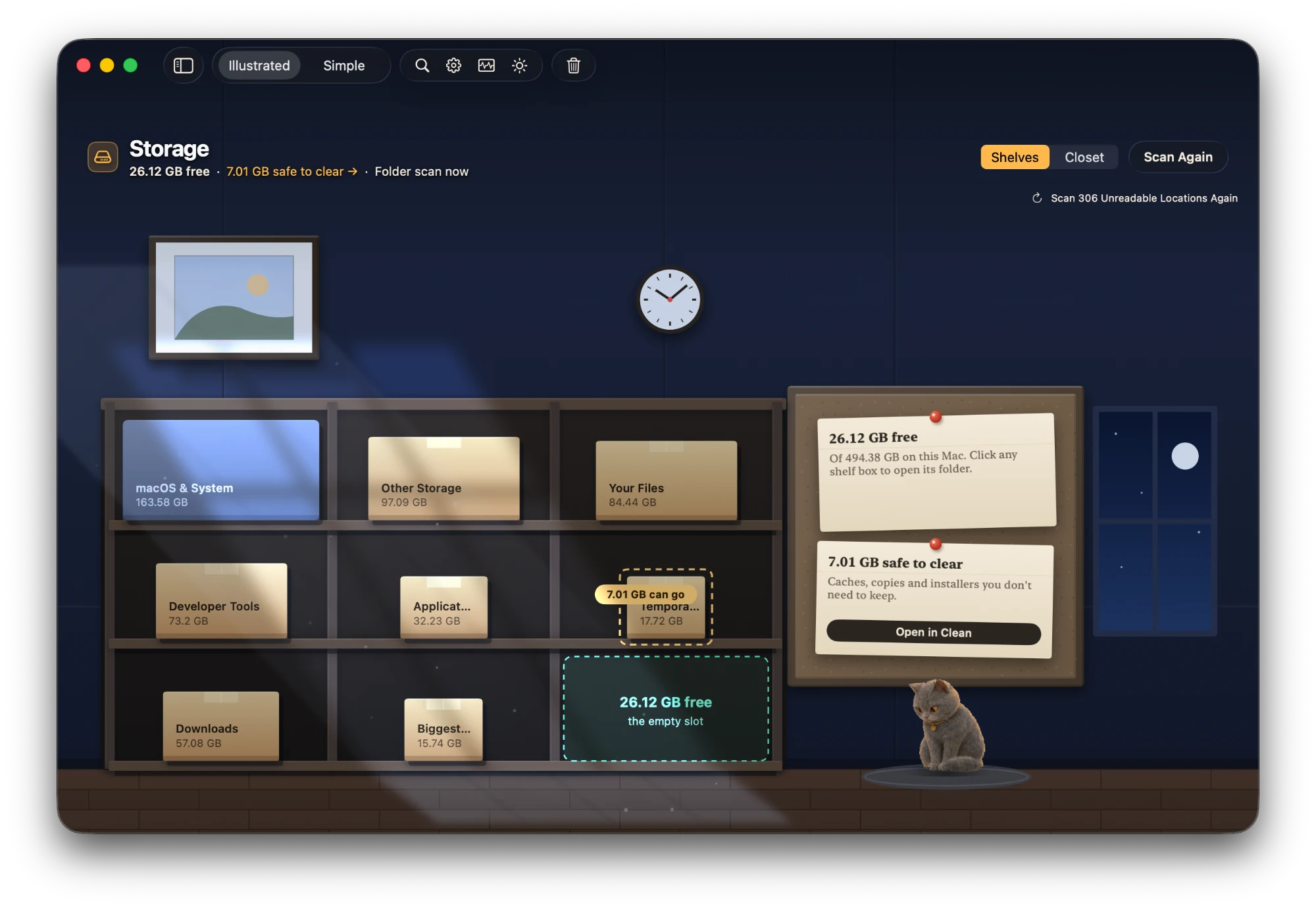
What a full Mac actually looked like
On our developer’s Mac, clearing an 11 GB Gradle cache and 724 MB of wrapper downloads took free space from 2.2 GB to 14 GB. That result makes more sense once you know what was in those folders. Gradle can download the dependencies again, and the next build may take longer while it does. The same reasoning would lead us to keep a large folder of project files. Read the full Gradle example for the paths and what to leave alone.
What to check before removing a large folder
| Tool | Where to look | What to check before removing it |
|---|---|---|
| macOS Storage and Finder | Start in System Settings › General › Storage. If you know the folder, use Finder’s Get Info to check its size. | Open the folder and identify its contents. Check how the specific removal action works before confirming it. |
| DaisyDisk | Follow the largest wedges in the disk map to the folder and inspect its files. | The Collector stages items for review. DaisyDisk’s guide says its Delete action removes them permanently after a five-second cancellation window. |
| Clean House | Open the Space room and use Peek to inspect contents. Check the explanation before deciding what to clear. | Move chosen items to the Trash. Recently Cleared can put them back until you empty the Trash. |
What does DaisyDisk do well?
DaisyDisk's own page lists a clear set of strengths. It scans as administrator to reveal restricted files, calculates precise space while excluding clones and hard links that take no extra space, and breaks down the "Other" and "System Data" categories. It can find and purge macOS snapshots, scan cloud storage such as Dropbox, Google Drive, OneDrive and Box, and preview files with the Space key. It says it collects no user data.
The price is $9.99 as a one-time purchase, with no recurring payments, and the license covers up to 5 personal Macs. There is a 30-day money-back guarantee and a free trial download. The current version listed is 4.34.2, and it supports macOS 10.13 or newer on Apple Silicon and Intel.
Prices checked November 2026.
If your question is "where did my space go?", DaisyDisk is hard to beat. The reason to look elsewhere is usually cost, wanting open source, or needing to know whether a big item is safe to remove, which a map alone does not say.
Which DaisyDisk alternatives are free?
| App | Price | What you get | Notes |
|---|---|---|---|
| DaisyDisk | $9.99 one-time | Interactive sunburst disk map, snapshot purge, cloud scans | Free trial; up to 5 personal Macs |
| GrandPerspective | Free (SourceForge); $2.99 on the Mac App Store | Treemap where each file is a rectangle sized by file size | Open source (GPL); version 3.8.1 needs macOS 14 or later |
| OmniDiskSweeper | Free | Lists files and folders largest to smallest, with Trash or open | Available from the Omni Group |
| Disk Inventory X | Free | Treemap of file and folder sizes | GPL; download listed for macOS 10.13 to 10.15; development stopped, the site points to forks |
| Clean House | Free to scan; first 5 GB of cleaning free; Pro one-time | Space shelves, "Why?" cards, Safe to clear / Look first / Keep, Trash first with undo | macOS 15 or later; Pro is $6.99 launch then $9.99 |
| Finder and Apple Storage settings | Built in | Get Info sizes, Storage view and recommendations | Less detail on hidden folders |
Prices checked November 2026.
How are GrandPerspective, OmniDiskSweeper and Disk Inventory X different?
GrandPerspective and Disk Inventory X both draw a treemap: every file is a rectangle, and bigger files get bigger rectangles. That lets you spot a huge file at a glance. GrandPerspective is currently maintained and asks for a recent macOS. Disk Inventory X's developer has stopped work on it, so on a current Mac you may prefer a maintained tool.
OmniDiskSweeper takes a plain-list approach. The Omni Group describes it as showing you the files on your drive, largest to smallest, and letting you quickly trash or open them. It is a good fit if a list reads easier to you than a picture.
Can I find big files with Finder alone?
Yes, with limits. Apple's Storage settings (System Settings, General, Storage) show a usage graphic, recommendations and manual cleanup options, such as deleting old iPhone backups and unused apps. Apple also notes that files in the Trash don't free space until you empty it. In Finder you can sort a folder by Size in list view after turning on Calculate All Sizes in View Options. It works, but it is slow to use for a whole disk and does not explain anything.
Why would I use Clean House instead of a disk map?
Clean House shows big folders as boxes in its Space room. Peek opens a view of what’s inside. A “Why?” card explains what the app can tell about the item, including where it came from and what removing it might do. That matters most when you recognize a tool like Gradle but have no idea which of its folders you can clear.
Cleaning only moves files to the Trash, and Recently Cleared puts them back until you empty the Trash. Scanning is free, and the first 5 GB of cleaning is free, so you can test it on your own Mac. Details are on the pricing page.
The trade-off: a dedicated visualizer like DaisyDisk is a more focused picture of your disk. We suggest using one for exploring and Clean House when you want to decide what to remove. For background, read what System Data is and how to free up space on a Mac.
Which should I choose?
- Want the best-looking map and don't mind $9.99? DaisyDisk.
- Want free and open source? GrandPerspective.
- Prefer a sorted list? OmniDiskSweeper.
- Want to be told what is safe, with undo? Clean House.